The 2 AM Maintenance Nightmare: When a Single Query Crashes Production
Every backend engineer knows this scene: the entire team pulls an all-nighter over the weekend, waiting for 2 AM to display the dreaded “System under maintenance, please check back later” banner before daring to trigger the migration. What follows is hours of nail-biting anxiety staring at terminal windows, praying the script finishes before 5 AM so the application can reopen in time.
This approach is fraught with risk. Imagine your users table contains 15–20 million rows. You casually run a query to rename a column or add a NOT NULL constraint without a default value. Instantly, PostgreSQL grabs an AccessExclusiveLock across the entire table.
Every incoming SELECT and INSERT query gets queued up behind it. The connection pool exhausts in under ten seconds. API gateways start throwing cascading 504 Gateway Timeouts, and your entire system grinds to a halt.
For a SaaS platform or payment gateway, even five minutes of peak-hour downtime can vaporize thousands of dollars in revenue and destroy user trust. Adopting Zero-Downtime Database Migration is an absolute necessity: it allows continuous schema updates while keeping the application fully available to users.
The Golden Rule: The Expand and Contract Pattern
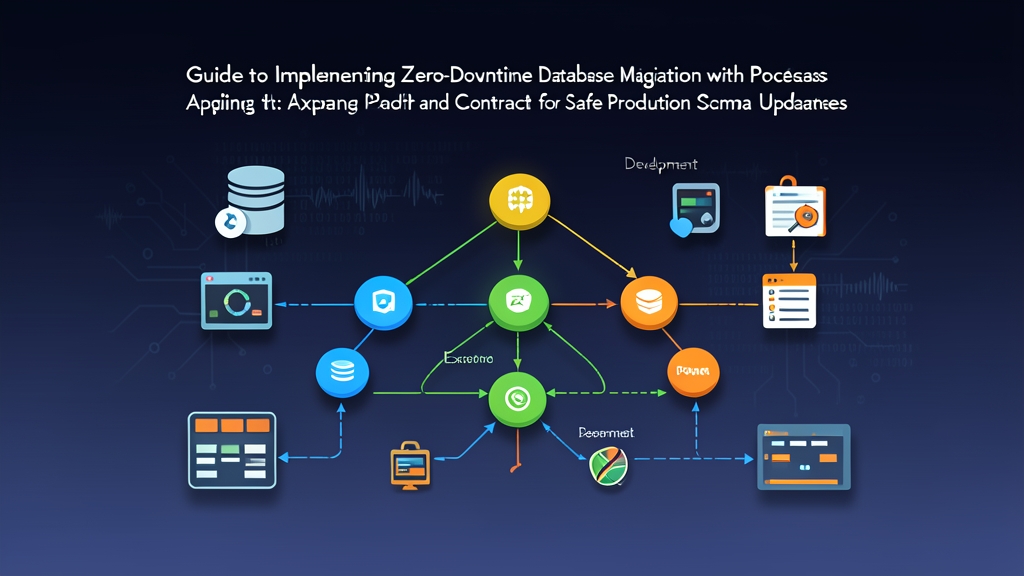
The secret to zero downtime boils down to a single principle: your code and database must always maintain backward compatibility across at least one version (N – 1). To achieve this, we use the industry-standard Expand and Contract Pattern (also known as Parallel Run).
Instead of stuffing every breaking change into a single high-risk migration, this pattern breaks the process down into three distinct phases:
- Phase 1: Expand: Add new columns or tables to the database alongside existing ones. New and old schemas coexist in parallel. The current version of your application continues reading and writing normally without disruption.
- Phase 2: Transition (Sync & Backfill): Enable dual-writing to both columns. Concurrently, run background workers to backfill legacy data into the new column. Once data parity reaches 100%, switch application reads to the new column.
- Phase 3: Contract (Cleanup): Once 100% of application traffic exclusively uses the new schema, safely drop the old column and remove synchronization triggers.
On our team’s recent project involving an orders table with over 30 million records, adopting this workflow allowed us to confidently deploy to production 3–4 times a day. No more late-night release vigils. Customers processed payments seamlessly while the database restructured quietly behind the scenes.
Step-by-Step Walkthrough: Safely Renaming a Column on a Multi-Million Row Table
Let’s dissect the most common scenario: your users table currently uses a full_name column, and you want to standardize it to name without dropping a single request.
Step 1: Expand – Add the New Column as Nullable
Create a new migration to add the name column. Do NOT delete or rename full_name at this stage.
-- Migration V1: Add new nullable column
ALTER TABLE users ADD COLUMN name VARCHAR(255);
The new column must be nullable (or include a constant default value in PostgreSQL 11+). This allows the engine to update metadata without rewriting the entire table, executing in milliseconds without table-locking bottlenecks.
Step 2: Dual-Writing via PostgreSQL Triggers
Now, every new insert or update must synchronize data between name and full_name. You can implement this either at the application layer or directly in PostgreSQL using a Trigger. Using database triggers is generally safer, as it eliminates race conditions when multiple microservices access the database concurrently.
-- Function to automatically cross-sync data
CREATE OR REPLACE FUNCTION sync_user_name_column()
RETURNS TRIGGER AS $$
BEGIN
    IF NEW.name IS NULL AND NEW.full_name IS NOT NULL THEN
        NEW.name := NEW.full_name;
    ELSIF NEW.name IS NOT NULL AND NEW.full_name IS NULL THEN
        NEW.full_name := NEW.name;
    END IF;
    RETURN NEW;
END;
$$ LANGUAGE plpgsql;

-- Trigger before every INSERT or UPDATE operation
CREATE TRIGGER trg_sync_user_name
BEFORE INSERT OR UPDATE ON users
FOR EACH ROW
EXECUTE FUNCTION sync_user_name_column();
Step 3: Backfill Existing Data in Batches
Incoming writes are now covered by the trigger. But what about the millions of existing rows? Their name column remains NULL. Never run a single monolithic UPDATE users SET name = full_name; statement, as it will lock the table solid and spike disk I/O to 100%.
Instead, chunk the work into smaller batches of 5,000 rows:
-- Batch backfill script
DO $$
DECLARE
    rows_updated INT := 1;
BEGIN
    WHILE rows_updated > 0 LOOP
        UPDATE users
        SET name = full_name
        WHERE id IN (
            SELECT id FROM users
            WHERE name IS NULL AND full_name IS NOT NULL
            ORDER BY id
            LIMIT 5000
        );
        GET DIAGNOSTICS rows_updated = ROW_COUNT;
        COMMIT; -- Release lock immediately after each batch
        PERFORM pg_sleep(0.05); -- Pause 50ms to let database CPU cool down
    END LOOP;
END $$;
Step 4: Switch Application Reads to the New Column
Once verification confirms 100% of rows have values in the name column, deploy the updated backend code. Update all SELECT queries to read directly from name. Keep the dual-writing logic intact for another 24–48 hours—this gives you a frictionless rollback path if any unforeseen bugs surface.
Step 5: Contract – Remove Triggers and Drop the Old Column
After the system runs smoothly for a few days without any anomalies in the logs, proceed to the final cleanup phase:
-- 1. Remove temporary synchronization trigger
DROP TRIGGER IF EXISTS trg_sync_user_name ON users;
DROP FUNCTION IF EXISTS sync_user_name_column();

-- 2. Drop the old column completely
ALTER TABLE users DROP COLUMN full_name;
At this point, the schema migration is complete. Your users continue browsing the app uninterrupted, completely oblivious to the major structural overhaul that just took place under the hood.
Critical Consideration: Building Indexes Without Locking the Table
If you need to add an index to the name column on a large table, avoid standard CREATE INDEX at all costs. It acquires a ShareLock and blocks all write operations (INSERT, UPDATE, DELETE). Always use the CONCURRENTLY keyword:
-- Build index in the background without blocking writes
CREATE INDEX CONCURRENTLY idx_users_name ON users(name);
Note: CREATE INDEX CONCURRENTLY cannot run inside an explicit transaction block, and it takes longer to finish because PostgreSQL must scan the table twice.
Conclusion
Zero-downtime migrations don’t require sci-fi tech or exorbitant infrastructure. The core ingredient is discipline. Rather than staking everything on a single high-stakes command, you de-risk the migration by splitting it into distinct Expand, Backfill, and Contract phases.
Mastering this technique will free you from midnight release shifts and elevate your architecture to genuine High Availability standards.