Midnight 504 Gateway Timeout: When Traditional RAG Falls Short
At exactly 2:15 AM, PagerDuty started buzzing incessantly as worker clusters fired mass 504 Gateway Timeout errors. Tracing through the logs revealed a familiar culprit: marketing had submitted an overly broad prompt requesting aggregated metrics across 20 competitors. The single-pass RAG pipeline attempted to cram dozens of raw web pages into a single LLM call. As a result, the context window blew past 128k tokens, not to mention that parallel web scraping threads timed out completely.
Production reality proves that vanilla RAG and zero-shot LLMs simply cannot handle deep research tasks. When confronted with complex queries, conventional pipelines execute one or two vector searches and immediately attempt an answer. Starved of data, the model either hallucinates or produces superficial, unusable reports.
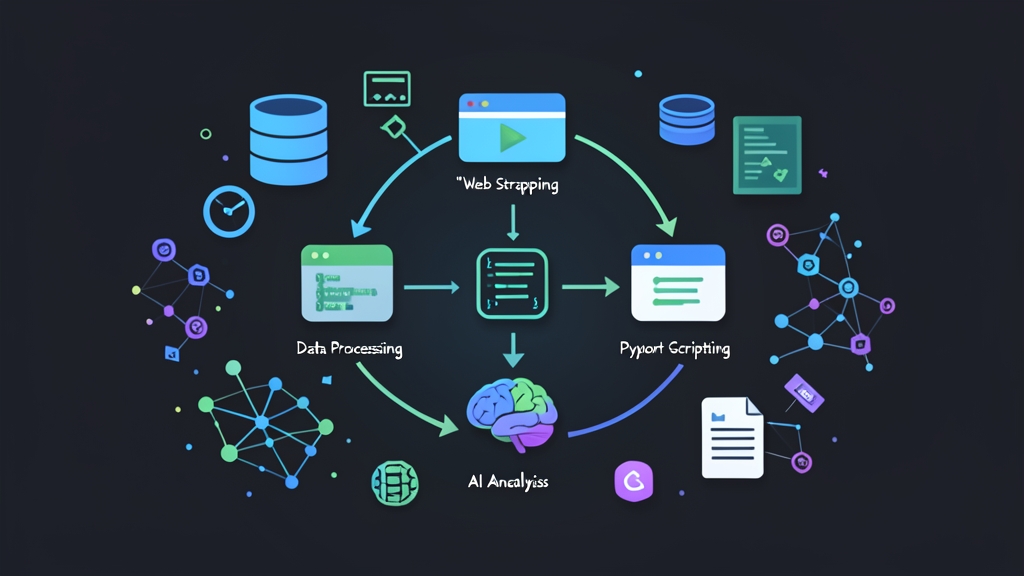
The Open Deep Research pattern fundamentally solves this problem. Instead of forcing the LLM to answer immediately, the system breaks the workflow into an autonomous loop:
- Planning: Deconstructs broad questions into smaller sub-problems (e.g., breaking down “AI chip comparison” into architecture, pricing, and inference throughput).
- Recursive Search: Queries search engines, skims retrieved content, and dynamically generates follow-up queries if missing metrics are detected.
- Synthesis & Fact-checking: Cross-references sources, filters out irrelevant noise, and generates structured Markdown reports with attributed source URLs.
Building this pipeline yourself with Python grants full control over execution flow. You can easily enforce token hard limits, prevent memory leaks, and eliminate dependencies on expensive closed-source APIs.
Environment Setup
On Ubuntu 22.04 / 24.04 servers, you should isolate dependencies in a dedicated virtual environment to prevent system package conflicts.
1. Setting Up the Virtual Environment
# Create working directory and activate Python 3.11+ virtual environment
mkdir -p /opt/open-deep-research && cd /opt/open-deep-research
python3 -m venv venv
source venv/bin/activate

# Upgrade core build tools
pip install --upgrade pip setuptools wheel
2. Installing Required Libraries
We select duckduckgo-search for zero-cost web queries without API keys, trafilatura for clean text extraction (stripping scripts, ads, and navigation bars), and the openai SDK for seamless compatibility with OpenAI, OpenRouter, or self-hosted vLLM/Ollama instances.
pip install openai duckduckgo-search trafilatura pydantic tenacity richBuilding the Deep Research Agent: Module by Module
To prevent infinite loops that drain quota, the codebase is split into three distinct components: a resilient web scraping module, an agent orchestrating the loop, and a test runner script.
1. Safe Web Search & Text Extraction Module
The tools.py file handles search and text extraction. It integrates retries with exponential backoff to handle network drops and rate limits gracefully.
import trafilatura
from duckduckgo_search import DDGS
from tenacity import retry, stop_after_attempt, wait_exponential

@retry(stop=stop_after_attempt(3), wait=wait_exponential(multiplier=1, min=2, max=6))
def search_web(query: str, max_results: int = 3) -> list[dict]:
    """Search the web via DuckDuckGo with retry logic for rate limits."""
    results = []
    with DDGS() as ddgs:
        raw_results = ddgs.text(query, max_results=max_results)
        if raw_results:
            for item in raw_results:
                results.append({
                    "title": item.get("title", ""),
                    "url": item.get("href", ""),
                    "snippet": item.get("body", "")
                })
    return results

def fetch_clean_content(url: str, max_chars: int = 4000) -> str:
    """Fetch webpage and extract main text, truncating characters to avoid context overflow."""
    try:
        downloaded = trafilatura.fetch_url(url, timeout=10)
        if not downloaded:
            return ""
        text = trafilatura.extract(downloaded, include_links=False, include_comments=False)
        return text[:max_chars] if text else ""
    except Exception as err:
        return f"Error fetching {url}: {err}"
2. Recursive Agent Orchestration Module
The agent.py file serves as the orchestrator. After processing documents in each iteration, the model evaluates itself: “Is the collected data sufficient in terms of metrics and arguments? If not, what query should be searched next?”
import os
import json
from openai import OpenAI
from tools import search_web, fetch_clean_content

client = OpenAI(api_key=os.getenv("OPENAI_API_KEY", "sk-mock-key"))

class DeepResearchAgent:
    def __init__(self, max_iterations: int = 3):
        self.max_iterations = max_iterations
        self.collected_evidence = []

    def plan_next_step(self, topic: str, history: str) -> dict:
        """Evaluate existing data and decide on the next search query."""
        prompt = f"""You are an advanced research AI. Objective: Research the topic: "{topic}"
Collected evidence so far:
{history}

Analyze the data and respond with exact JSON matching this schema:
{{
  "is_sufficient": true/false,
  "reason": "Brief explanation of why data is sufficient or what specific metrics are still missing",
  "next_query": "Next search keyword if more info is needed (leave empty if sufficient)"
}}"""
        response = client.chat.completions.create(
            model="gpt-4o-mini",
            response_format={"type": "json_object"},
            messages=[{"role": "user", "content": prompt}],
            temperature=0.2
        )
        return json.loads(response.choices[0].message.content)

    def run(self, topic: str) -> str:
        print(f"[*] Starting research: {topic}")
        current_query = topic

        for iteration in range(1, self.max_iterations + 1):
            print(f"\n--- Iteration {iteration}/{self.max_iterations}: Searching '{current_query}' ---")
            search_hits = search_web(current_query, max_results=2)

            for hit in search_hits:
                url = hit["url"]
                print(f" -> Crawling: {url}")
                page_text = fetch_clean_content(url)
                if page_text:
                    self.collected_evidence.append({
                        "source": url,
                        "query": current_query,
                        "snippet": page_text
                    })

            # Pass the most recent evidence summary to the Agent for review
            evidence_summary = "\n".join([
                f"- Source [{e['source']}]: {e['snippet'][:250]}..."
                for e in self.collected_evidence[-4:]
            ])

            decision = self.plan_next_step(topic, evidence_summary)
            if decision.get("is_sufficient") or iteration == self.max_iterations:
                print(f"[*] Stop condition met: {decision.get('reason')}")
                break

            current_query = decision.get("next_query", topic)

        return self.generate_report(topic)

    def generate_report(self, topic: str) -> str:
        """Synthesize all gathered evidence into a comprehensive technical report."""
        print("\n[*] Synthesizing final report...")
        raw_data = "\n\n".join([
            f"### Source: {e['source']}\n{e['snippet']}"
            for e in self.collected_evidence
        ])

        system_prompt = "You are a technical research analyst. Write a detailed synthesized report in Markdown based strictly on the provided citations. You must include the corresponding source URL for every key point."
        user_prompt = f"Topic: {topic}\n\nResearch Data:\n{raw_data}"

        response = client.chat.completions.create(
            model="gpt-4o-mini",
            messages=[
                {"role": "system", "content": system_prompt},
                {"role": "user", "content": user_prompt}
            ],
            temperature=0.3
        )
        return response.choices[0].message.content
3. Test Runner Script
The main.py script accepts an input topic, triggers the worker, and saves the output to a Markdown file:
import os
from agent import DeepResearchAgent

def main():
    if not os.getenv("OPENAI_API_KEY"):
        raise ValueError("Missing OPENAI_API_KEY environment variable!")

    topic = "External Memory Architectures for AI Agents: Evaluating MemGPT vs Traditional Vector DBs on Latency and Token Costs"
    agent = DeepResearchAgent(max_iterations=3)
    report = agent.run(topic)

    output_file = "deep_research_report.md"
    with open(output_file, "w", encoding="utf-8") as f:
        f.write(report)

    print(f"\n[✓] Done! Report saved to: {output_file}")

if __name__ == "__main__":
    main()
Production Operations: Keeping Budgets and Server Resources in Check
Code running smoothly on localhost does not guarantee it will survive in production. When assigning workers to process hundreds of tasks daily, you need to implement the following three technical guardrails:
1. Testing the Live Execution Flow
Run the script and monitor detailed logs in your terminal:
export OPENAI_API_KEY="sk-your-actual-api-key"
python3 main.py
The terminal will clearly illustrate the Agent’s reasoning step-by-step. For instance, in iteration 1, the Agent reads the definition of MemGPT; by iteration 2, it recognizes a lack of latency benchmarks and proactively generates the query MemGPT vs Pinecone latency benchmark for further research before exporting deep_research_report.md.
2. Three Failure Points and How to Prevent Them
- Iteration Cap: Always set
max_iterations = 3(at most 4). Each iteration consumes roughly 3,000–5,000 tokens. Leaving the Agent unconstrained on ambiguous topics can trigger 15–20 loops, burning through $10–$15 in API credits within an hour. - Text Buffer Truncation: Cap content at
max_chars = 4000(~1,000 tokens) per URL. Certain news sites with embedded scripts or Wikipedia entries exceed 20,000 words. Scraping three such pages without truncation will blow out the 128k context window in the very first iteration. - Resource Limits with Systemd: Avoid running background scripts manually via
nohuportmux. Instead, configure a systemd service with strict memory quotas to prevent memory leaks from crashing co-located databases on the same VPS:
# /etc/systemd/system/deep-research-worker.service
[Unit]
Description=Deep Research Agent Worker
After=network.target

[Service]
Type=simple
User=ubuntu
WorkingDirectory=/opt/open-deep-research
ExecStart=/opt/open-deep-research/venv/bin/python main.py
Restart=on-failure
RestartSec=10s
MemoryMax=1.5G

[Install]
WantedBy=multi-user.target
After enabling the service, use systemctl status deep-research-worker to inspect process health and monitor real-time logs with journalctl -u deep-research-worker -f to catch bot blocks or CAPTCHAs early.